<<< Return to Recording the Spectra
Processing the Spectra
(Note: I wrote
this in 2008 so while the procedure is the same, more up
to date software doing
the same tasks is
available)
You may be content just to view your spectrum images directly to
spot differences qualitatively but if you want to make
quantitative measurements
on them
then you need to do some
processing
using some or all of
the stages
described
below.
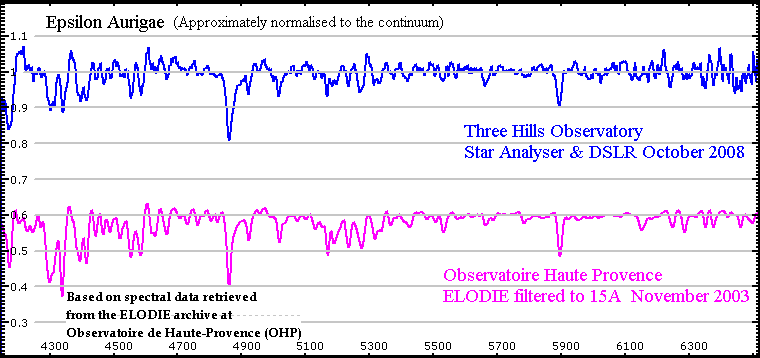
The quality of the resulting spectra can be judged from
the comparison of Epsilon Aurigae spectra using this
technique with a
professional high
resolution spectrum of
the same
object filtered to give
15A
resolution.
There is
nothing particularly special in the
processing
of the spectra obtained
this way. The
techniques
outlined
here are equally
applicable to
spectra taken using other
equipment.
Converting the
raw
images into a fully calibrated
spectrum
consists of
two main steps,
Image Calibration and
Data
Reduction
Image
Calibration
(See also this pdf document for more details)
If we are using a DSLR
camera we first need
to discard the
colour information. I
use the procedure in
IRIS "Digital
Photo", "Decode raw files" , "CR2 >> B+W"
to
convert all my images,
darks and
flats to fits files in
one
batch.
The next
stage is to
correct the
fits images
using darks. (See here as to why I no longer recommend a flat
correction) This is the same process as
performed on
conventional images so
will not be described
in detail
here.
I currently happen to
use ImageTOOLSca
to do
the dark correction and then inspect and correct
any remaining hot/cold
pixels/cosmic
ray hits close to or
embedded in the
spectrum using Teleauto but
that is a mainly
historic personal preference. Many other
programs, IRIS
for example will
do all
these jobs.
Next the individual frames need
to be
aligned and
stacked (I happen
to use K3CCDTools but
again many other programs can be used, including
IRIS)
Note unlike "pretty picture"
astro-imaging, this
is as far
as the
image manipulation
goes. We
are after scientific
accuracy
not aesthetic
appearance so
no non linear stretching, noise reduction, blurring,
sharpening etc!
Next we need to make some
corrections which are unique to
spectrum images.
IRIS
has
some specific tools for this.
1.
Remove
any tilt in the spectrum
to make it
horizontal. The
procedure
in
IRIS is "Spectro" ,"Tilt
of
a 2D spectra"
(Note
because
these spectra are
so narrow there is
significant risk that this
step can
introduce artifacts so hopefully you will not
need to do
it if your
orientation was spot on. Note also
that a tilted spectrum alters the
wavelength
calibration by
cos(angle) so the same grating orientation
and tilt correction should be used for both
calibration and target
star.
2. If you are
using an undriven mount any slant in the
spectral
lines should
be corrected to make the lines square to the
dispersion direction. The IRIS procedure
is
"Spectro", "Slant of a 2D
spectra"
3. Subtract the
sky
background. This is an important
step if any
quantitative measurements are
going to be made on
the
spectrum.
The procedure in
IRIS
is "Spectro"
"Remove sky
to a 2D spectra" You have
to select two
zones, one
either side
of the spectrum which
represent the local background. If
you use the
median option, it will discount faint stars in
the
zones but you
need to avoid
including any of the
wanted
spectrum, bright stars or
any
spectra from
other stars.
(Increase the brightness in the image to spot
these)
I suggest using zones
about 30-60 pixels
wide. Too
narrow zones
can
introduce noise into the
spectrum. Too wide zones and the
accuracy of
subtraction deteriorates.
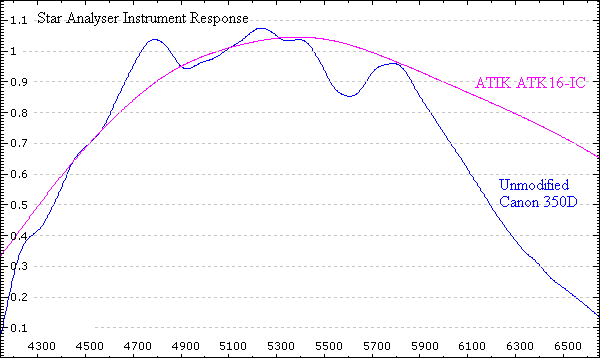
Because of the short focal length of the lens compared with
a telescope, the star size is very small and therefore the
individual spectra
are too
narrow to average out
coverage of the different filter
colour
pixels.
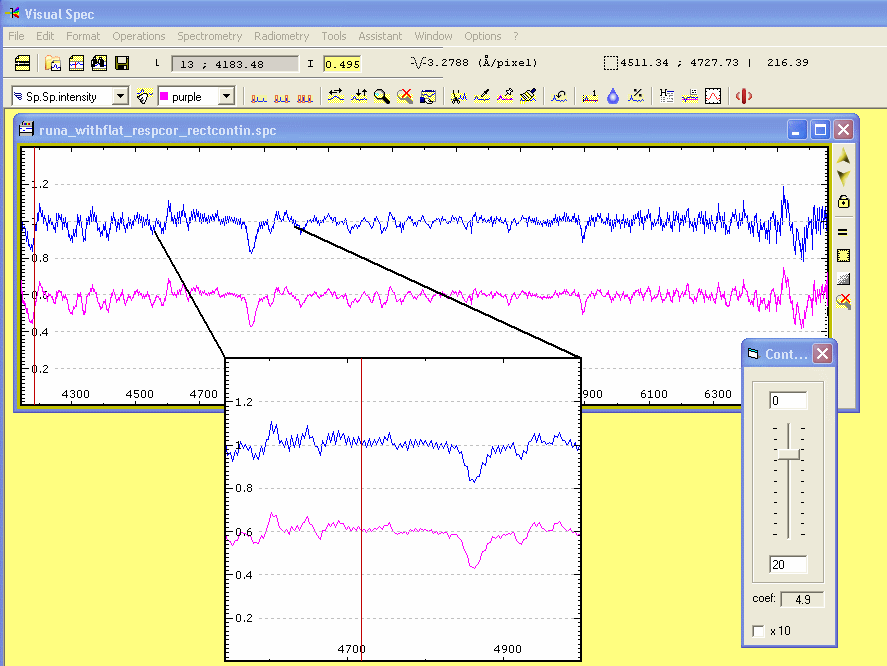
This can
give artifacts which
appear as sawtooth variations from
pixel to pixel.
These can be reduced by stacking a large
number of
spectrum
images, moving
the camera
slightly
between each exposure. Even so, some
residual
variation
may be
seen. This can be
reduced by slight filtering (in this
case a spline filter
was applied using Visual Spec)
without significantly
affecting the
resolution.